







ウェブスクレイピングでは、使用するツールに関わらずHTMLパースが不可欠です。Javaによるウェブスクレイピングも例外ではありません。PythonではRequestsやBeautifulSoupといったツールを使用します。Javaではjsoupを用いてHTTPリクエストを送信しHTMLをパースできます。本チュートリアルではBooks to Scrapeを使用します。
はじめに
このチュートリアルでは、依存関係管理にMavenを使用します。まだインストールしていない場合は、こちらからMavenをインストールできます。
Mavenのインストールが完了したら、新しいJavaプロジェクトを作成します。以下のコマンドでjsoup-スクレイパーという新規プロジェクトを生成します。
mvn archetype:generate -DgroupId=com.example -DartifactId=jsoup-スクレイパー -DarchetypeArtifactId=maven-archetype-quickstart -DinteractiveMode=false
次に、関連する依存関係を追加する必要があります。pom.xml内のコードを以下のコードで置き換えてください。これはRustのCargoによる依存関係管理と類似しています。
<project xmlns="http://maven.apache.org/POM/4.0.0" xmlns:xsi="http://www.w3.org/2001/XMLSchema-instance"
  xsi:schemaLocation="http://maven.apache.org/POM/4.0.0 http://maven.apache.org/maven-v4_0_0.xsd">
  <modelVersion>4.0.0</modelVersion>
  <groupId>com.example</groupId>
  <ARTIFACTID>jsoup-スクレイパー</ARTIFACTID>
  <PACKAGING>jar</PACKAGING>
  <VERSION>1.0-SNAPSHOT</VERSION>
  <NAME>jsoup-スクレイパー</NAME>
  <URL>http://maven.apache.org</URL>
  <DEPENDENCIES>
    <dependency>
      <groupId>junit</groupId>
      <artifactId>junit</artifactId>
      <version>3.8.1</version>
      <scope>test</scope>
    </dependency>
    <dependency>
        <groupId>org.jsoup</groupId>
        <artifactId>jsoup</artifactId>
        <version>1.16.1</version>
    </dependency>
  </dependencies>
  <properties>
    <maven.compiler.source>17</maven.compiler.source>
    <maven.compiler.target>17</maven.compiler.target>
</properties>
</project>
以下のコードをApp.javaに貼り付けてください。大した量ではありませんが、これから構築する基本的なスクレイパーです。
package com.example;

import org.jsoup.Jsoup;
import org.jsoup.nodes.Document;
import org.jsoup.nodes.Element;
import org.jsoup.select.Elements;

public class App {
    public static void main(String[] args) {

        String url = "https://books.toscrape.com";
        int pageCount = 1;

        while (pageCount <= 1) {

            try {
                System.out.println("---------------------PAGE "+pageCount+"--------------------------");

                //ウェブサイトに接続しHTMLを取得
                Document doc = Jsoup.connect(url).get();

                //タイトルを出力
                System.out.println("ページタイトル: " + doc.title());


            } catch (Exception e) {
                e.printStackTrace();
            }
        }
        System.out.println("スクレイピングした総ページ数: "+(pageCount-1));
    }
}
Jsoup.connect("https://books.toscrape.com").get(): この行はページを取得し、操作可能なDocumentオブジェクトを返します。doc.title() はHTML ドキュメント内のタイトルを返します。この例では:All products | Books to Scrape - Sandbox.
JsoupでのDOMメソッドの使用
jsoupには、DOM(Document Object Model)内の要素を見つけるための様々なメソッドが含まれています。以下のいずれかを使用して、ページ要素を簡単に見つけることができます。
getElementById():IDを使用して要素を検索します。getElementsByClass(): CSSクラスを使用して全ての要素を検索します。getElementsByTag():HTMLタグで要素を検索します。getElementsByAttribute(): 特定の属性を持つ要素をすべて検索します。
getElementById
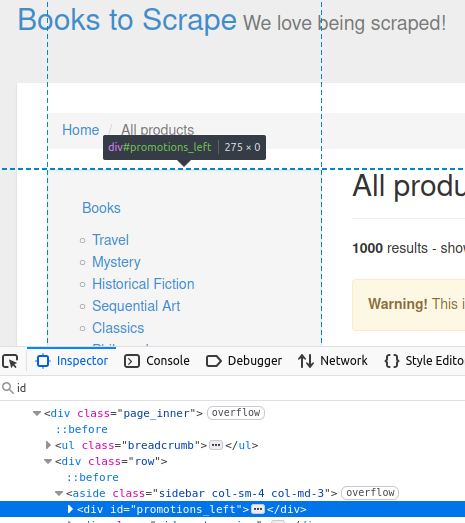
対象サイトでは、サイドバーにidが promotions_leftの divが含まれています。下の画像で確認できます。
//IDによる取得
Element sidebar = doc.getElementById("promotions_left");

System.out.println("サイドバー: " + sidebar);
このコードは、ページ検査ツールで確認できるHTML要素を出力します。
Sidebar: <div id="promotions_left">
</div>
getElementsByTag()
getElementsByTag() を使用すると、特定のタグを持つページ上の全要素を検索できます。このページの書籍を例に考えてみましょう。
各書籍は固有のarticleタグで囲まれています。
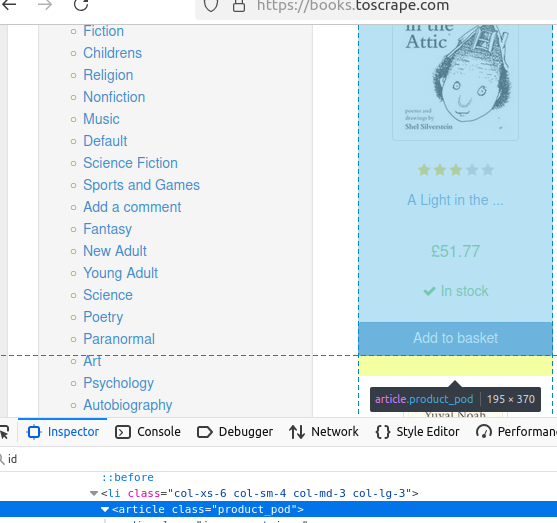
以下のコードは何も出力しませんが、書籍の配列を返します。これらの書籍が、残りのデータの基盤となります。
//タグで取得
Elements books = doc.getElementsByTag("article");
getElementsByClass
書籍の価格を見てみましょう。ハイライトされているように、そのクラスはprice_color です。
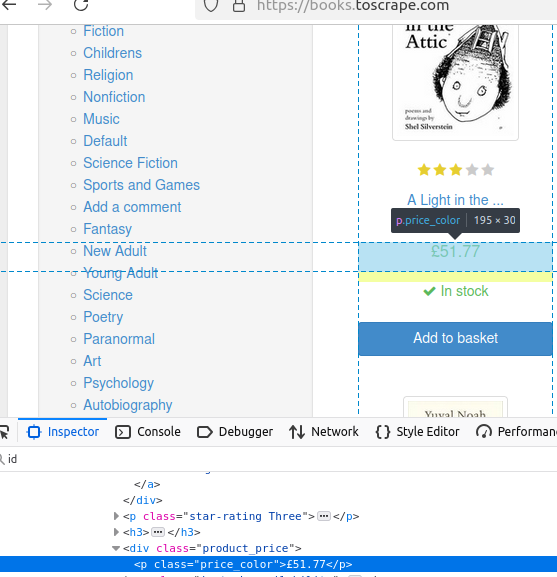
このスニペットでは、price_colorクラスの全要素を検索します。.first().text()を使用して最初の要素のテキストを出力します。
System.out.println("価格: " + book.getElementsByClass("price_color").first().text());
getElementsByAttribute
既にご存知かもしれませんが、すべてのa要素 にはhref属性が必須です。以下のコードでは、getElementsByAttribute("href")を使用してhrefを持つ全要素を検索します。.first().attr("href")でそのhrefを返します。
//属性による取得
Elements hrefs = book.getElementsByAttribute("href");
System.out.println("リンク: https://books.toscrape.com/" + hrefs.first().attr("href"));
高度なテクニック
CSSセレクタ
複数の条件で要素を検索したい場合、select()メソッドにCSSセレクタを渡せます。このメソッドはセレクタに一致する全オブジェクトの配列を返します。以下ではli[class='next']でnextクラスを持つli要素を全て検索します。
Elements nextPage = doc.select("li[class='next']");
ページネーションの処理
ページネーションを処理するため、nextPage.first() を使用して配列から返された最初の要素に対してgetElementsByAttribute("href").attr("href") を呼び出し、そのhref を抽出します。興味深いことに、2ページ目以降はリンクから「カタログ」という単語が削除されるため、href に存在しない場合はこれを追加します。 このリンクをベースURLと結合し、次のページへのリンクを取得します。
if (!nextPage.isEmpty()) {
    String nextUrl = nextPage.first().getElementsByAttribute("href").attr("href");
    if (!nextUrl.contains("catalogue")) {
        nextUrl = "catalogue/"+nextUrl;
    }
    url = "https://books.toscrape.com/" + nextUrl;
    pageCount++;
}
すべてをまとめる
以下が最終的なコードです。複数のページをスクレイピングしたい場合は、while (pageCount <= 1) 内の1 を目的の数に変更してください。4ページスクレイピングする場合はwhile (pageCount <= 4) を使用します。
import org.jsoup.Jsoup;
import org.jsoup.nodes.Document;
import org.jsoup.nodes.Element;
import org.jsoup.select.Elements;

public class App {
    public static void main(String[] args) {

        String url = "https://books.toscrape.com";
        int pageCount = 1;

        while (pageCount <= 1) {

            try {
                System.out.println("---------------------PAGE "+pageCount+"--------------------------");

                //ウェブサイトに接続しHTMLを取得
                Document doc = Jsoup.connect(url).get();

                //タイトルを出力
                System.out.println("ページタイトル: " + doc.title());

                //IDで取得
                Element sidebar = doc.getElementById("promotions_left");

                System.out.println("サイドバー: " + sidebar);

                //タグで取得
                Elements books = doc.getElementsByTag("article");

                for (Element book : books) {
                    System.out.println("------書籍------");
                    System.out.println("タイトル: " + book.getElementsByTag("img").first().attr("alt"));
                    System.out.println("価格: " + book.getElementsByClass("price_color").first().text());
                    System.out.println("在庫状況: " + book.getElementsByClass("instock availability").first().text());

                    //属性で取得
                    Elements hrefs = book.getElementsByAttribute("href");
                    System.out.println("リンク: https://books.toscrape.com/" + hrefs.first().attr("href"));
                }

                //CSSセレクタで次ページボタンを検索
                Elements nextPage = doc.select("li[class='next']");
                if (!nextPage.isEmpty()) {
                    String nextUrl = nextPage.first().getElementsByAttribute("href").attr("href");
                    if (!nextUrl.contains("catalogue")) {
                        nextUrl = "catalogue/"+nextUrl;
                    }
                    url = "https://books.toscrape.com/" + nextUrl;
                    pageCount++;
                }

            } catch (Exception e) {
                e.printStackTrace();
            }
        }
        System.out.println("スクレイピングした総ページ数: "+(pageCount-1));
    }
}
コードを実行する前に、コンパイルすることを忘れないでください。
mvn package
次に、以下のコマンドで実行します。
mvn exec:java -Dexec.mainClass="com.example.App"
以下は最初のページの出力です。
---------------------ページ1--------------------------
ページタイトル: 全商品 | スクレイピング対象書籍 - サンドボックス
サイドバー: <div id="promotions_left">
</div>
------書籍------
タイトル: A Light in the Attic
価格: £51.77
在庫状況: 在庫あり
リンク: https://books.toscrape.com/catalogue/a-light-in-the-attic_1000/index.html
------書籍------
タイトル: Tipping the Velvet
価格: £53.74
在庫状況: 在庫あり
リンク: https://books.toscrape.com/catalogue/tipping-the-velvet_999/index.html
------書籍------
タイトル: 服従
価格: £50.10
在庫状況: 在庫あり
リンク: https://books.toscrape.com/catalogue/soumission_998/index.html
------書籍------
タイトル: シャープ・オブジェクツ
価格: £47.82
在庫状況: 在庫あり
リンク: https://books.toscrape.com/catalogue/sharp-objects_997/index.html
------書籍------
タイトル: サピエンス全史
価格: £54.23
在庫状況: 在庫あり
リンク: https://books.toscrape.com/catalogue/sapiens-a-brief-history-of-humankind_996/index.html
------書籍------
タイトル: レクイエム・レッド
価格: £22.65
在庫状況: 在庫あり
リンク: https://books.toscrape.com/catalogue/the-requiem-red_995/index.html
------書籍------
タイトル: 夢の仕事を手に入れるための汚い小さな秘密
価格: £33.34
在庫状況: 在庫あり
リンク: https://books.toscrape.com/catalogue/the-dirty-little-secrets-of-getting-your-dream-job_994/index.html
------書籍------
タイトル: 来るべき女: 悪名高きフェミニスト、ヴィクトリア・ウッドハルの人生に基づく小説
価格: £17.93
在庫状況: 在庫あり
リンク: https://books.toscrape.com/catalogue/the-coming-woman-a-novel-based-on-the-life-of-the-infamous-feminist-victoria-woodhull_993/index.html
------書籍------
タイトル: 『ボートに乗った少年たち:1936年ベルリン五輪で金メダルを目指す9人のアメリカ人』
価格: £22.60
在庫状況: 在庫あり
リンク: https://books.toscrape.com/catalogue/the-boys-in-the-boat-nine-americans-and-their-epic-quest-for-gold-at-the-1936-berlin-olympics_992/index.html
------書籍------
タイトル: ブラック・マリア
価格: £52.15
在庫状況: 在庫あり
リンク: https://books.toscrape.com/catalogue/the-black-maria_991/index.html
------書籍------
タイトル: 飢えた心たち (三角貿易三部作 #1)
価格: £13.99
在庫状況: 在庫あり
リンク: https://books.toscrape.com/catalogue/starving-hearts-triangular-trade-trilogy-1_990/index.html
------書籍------
タイトル: シェイクスピアのソネット集
価格: £20.66
在庫状況: 在庫あり
リンク: https://books.toscrape.com/catalogue/shakespeares-sonnets_989/index.html
------書籍------
タイトル: セット・ミー・フリー
価格: £17.46
在庫状況: 在庫あり
リンク: https://books.toscrape.com/catalogue/set-me-free_988/index.html
------書籍------
タイトル: スコット・ピルグリムの尊い小さな人生 (スコット・ピルグリム #1)
価格: £52.29
在庫状況: 在庫あり
リンク: https://books.toscrape.com/catalogue/scott-pilgrims-precious-little-life-scott-pilgrim-1_987/index.html
------書籍------
タイトル: リップ・イット・アップ・アンド・スタート・アゲイン
価格: £35.02
在庫状況: 在庫あり
リンク: https://books.toscrape.com/catalogue/rip-it-up-and-start-again_986/index.html
------書籍------
タイトル: 私たちのバンドが君の人生になる: アメリカン・インディー・アンダーグラウンドの現場、1981-1991
価格: £57.25
在庫状況: 在庫あり
リンク: https://books.toscrape.com/catalogue/our-band-could-be-your-life-scenes-from-the-american-indie-underground-1981-1991_985/index.html
------書籍------
タイトル: オリオ
価格: £23.88
在庫状況: 在庫あり
リンク: https://books.toscrape.com/catalogue/olio_984/index.html
------書籍------
タイトル: メサエリオン: 1800-1849年 最高のSF短編集
価格: £37.59
在庫状況: 在庫あり
リンク: https://books.toscrape.com/catalogue/mesaerion-the-best-science-fiction-stories-1800-1849_983/index.html
------書籍------
タイトル: リバタリアニズム入門
価格: £51.33
在庫状況: 在庫あり
リンク: https://books.toscrape.com/catalogue/libertarianism-for-beginners_982/index.html
------書籍------
タイトル: それはヒマラヤに過ぎない
価格: £45.17
在庫状況: 在庫あり
リンク: https://books.toscrape.com/catalogue/its-only-the-himalayas_981/index.html
スクレイピングした総ページ数: 1
まとめ
jsoupを使用したHTMLデータの抽出方法を学んだことで、より高度なウェブスクレイパーの構築を始められます。商品リスト、ニュース記事、研究データのスクレイピングを問わず、動的コンテンツの処理とブロック回避が重要な課題です。
スクレイピング作業を効率的に拡大するには、Bright Dataのツールをご検討ください:
- レジデンシャルプロキシ– IP禁止を回避し、地域制限コンテンツにアクセス。
- スクレイピングブラウザ– JavaScriptを多用するサイトを簡単にレンダリング。
- すぐに使えるデータセット– スクラッピングを完全に省略し、構造化されたデータを即座に入手。
jsoupと適切なインフラを組み合わせることで、検出リスクを最小限に抑えながら大規模なデータ抽出が可能です。ウェブスクレイピングを次のレベルへ進化させる準備はできていますか?今すぐ登録して無料トライアルを開始しましょう。