
SeleniumBaseは、テスト環境でSeleniumインスタンスを実行するためのラッパーとして設計されています。とはいえ、単なるラッパー以上の機能を持っています。SeleniumBaseを使えば、認証済みプロキシを使ってSeleniumを実行することができます。
Seleniumに内在するプロキシの問題
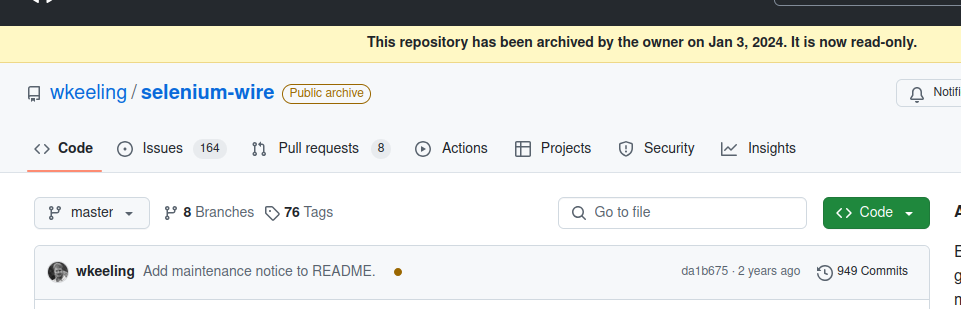
Seleniumには、あまり良いプロキシのサポートがありません。 --proxy-server 引数をSeleniumに渡すことはできますが、 認証済みプロキシのサポートはありません。 さらに事態は悪化します。長年にわたり、 SeleniumWire がSeleniumでプロキシを使う際の定番の選択肢でした。統合は非常に簡単でした。残念ながら、 SeleniumWireは1年以上前に非推奨となり、2年以上更新がありません。
はじめに
始めるには、SeleniumBaseをインストールし、テストケースを書く必要があります。テストケースは、実際にSeleniumを制御し、webdriverインスタンスを実行するものです。
インストール
pip install seleniumbase
テストケースを書く
こちらがシンプルなテストケースです。以下のコードは、 IPinfo APIにリクエストを送ります。JSONレスポンスを受信した後、それをパースし、内容をコンソールに出力します。
from seleniumbase import BaseCase
from selenium.webdriver.common.by import By
import json

class ProxyTest(BaseCase):
   def test_proxy(self):
        #go to the site
        self.driver.get("https://ipinfo.io/json")

        #load the json response
        location_info = json.loads(self.driver.find_element(By.TAG_NAME, "body").text)

        #iterate through the dict and print its contents
        for k,v in location_info.items():
            print(f"{k}: {v}")
テストの実行
実際にコードを実行するには、テストを実行する必要があります。 python name_of_your_script.py の代わりに、 pytest を使用します。
プロキシなしの場合
プロキシなしでテストスクリプトを実行したい場合は、以下のコマンドを使用できます。
pytest proxy_test.py -s
これと似たようなレスポンスが返されます。
=================================================== test session starts ===================================================
platform linux -- Python 3.10.12, pytest-8.3.4, pluggy-1.5.0
rootdir: /home/nultinator/clients/bright-data/seleniumbase-proxies
plugins: html-4.0.2, metadata-3.1.1, anyio-4.0.0, seleniumbase-4.34.6, ordering-0.6, rerunfailures-15.0, xdist-3.6.1
collected 1 item

proxy_test.py ip: 23.28.108.255
hostname: d28-23-255-108.dim.wideopenwest.com
city: Westland
region: Michigan
country: US
loc: 42.3242,-83.4002
org: AS12083 WideOpenWest Finance LLC
postal: 48185
timezone: America/Detroit
readme: https://ipinfo.io/missingauth
.

==================================================== 1 passed in 1.01s ====================================================
プロキシの設定
プロキシを使用するには、 --proxy フラグの後にプロキシのURLを指定するだけです。以下の形式を参照してください。
--proxy=your_proxy_url:your_proxy_port
無料プロキシ
こちらは無料プロキシを使用する例です。IPアドレスは155.54.239.64で、ポート80で通信しています。
--proxy=155.54.239.64:80
認証済みプロキシ
認証済みプロキシも同様に扱われます。認証済みプロキシを使う場合は、URLにユーザー名とパスワードを含めるだけです。
proxy=<YOUR_USERNAME>:<YOUR_PASSWORD>@<PROXY_URL>:<PROXY_PORT>
最適な認証済みプロキシのタイプとプロバイダー
Seleniumで認証済みプロキシを使用する場合、最適な選択肢はレジデンシャルプロキシ、データセンター・プロキシ、ISPプロキシであり、それぞれ異なるレベルの匿名性と信頼性を提供します。レジデンシャルプロキシは、実際のユーザーIPを使用することで最も高い成功率を提供し、ボット検出を回避するのに理想的です。データセンター・プロキシは高速でコスト効率が良いですが、検出されやすくなります。ISPプロキシは両方の利点を兼ね備え、高い信頼性とスピードを提供します。
推奨プロバイダー:
- ジオターゲティング
- ローテーションプロキシ
SeleniumBaseスクレイピングには、Bright Dataのレジデンシャルプロキシが最も信頼性の高い選択肢であり、高い成功率と最小限のブロックを実現します。
プロキシを使用して実行する
以下の例は、Bright Dataのプロキシの一つを使用するように設定されています。ユーザー名、ゾーン名、パスワードはご自身のものに置き換えてください。
pytest proxy_test.py --proxy=brd-customer-<YOUR-USERNAME>-zone-<YOUR-ZONE-NAME>:<YOUR-PASSWORD>@brd.superproxy.io:33335 -s
実行すると、以下のような出力が得られます。よく見ると、場所が変わっているのが分かります。
=================================================== test session starts ===================================================
platform linux -- Python 3.10.12, pytest-8.3.4, pluggy-1.5.0
rootdir: /home/nultinator/clients/bright-data/seleniumbase-proxies
plugins: html-4.0.2, metadata-3.1.1, anyio-4.0.0, seleniumbase-4.34.6, ordering-0.6, rerunfailures-15.0, xdist-3.6.1
collected 1 item

proxy_test.py ip: 144.202.4.246
hostname: 144-202-4-246.lum-int.io
city: Piscataway
region: New Jersey
country: US
loc: 40.4993,-74.3990
org: AS20473 The Constant Company, LLC
postal: 08854
timezone: America/New_York
readme: https://ipinfo.io/missingauth
.

==================================================== 1 passed in 3.25s ====================================================
場所をコントロールする
当社のプロキシを使えば、場所を選択することもできます。これは、 country フラグを使うことで実現できます。各国には、プロキシに渡すことができる2文字の国コードがあります。
pytest proxy_test.py --proxy=brd-customer-<YOUR-USERNAME>-zone-<YOUR-ZONE-NAME>:<YOUR-PASSWORD>[email protected]:33335 -s
国コードとして es (スペイン)を使用すると、スペインのプロキシを経由してルーティングされます。以下の出力でこれを確認できます。
=================================================== test session starts ===================================================
platform linux -- Python 3.10.12, pytest-8.3.4, pluggy-1.5.0
rootdir: /home/nultinator/clients/bright-data/seleniumbase-proxies
plugins: html-4.0.2, metadata-3.1.1, anyio-4.0.0, seleniumbase-4.34.6, ordering-0.6, rerunfailures-15.0, xdist-3.6.1
collected 1 item

proxy_test.py ip: 176.119.14.158
city: Paracuellos de Jarama
region: Madrid
country: ES
loc: 40.5035,-3.5278
org: AS203020 HostRoyale Technologies Pvt Ltd
postal: 28860
timezone: Europe/Madrid
readme: https://ipinfo.io/missingauth
.

==================================================== 1 passed in 3.98s ====================================================
ジオロケーションに関するドキュメントは こちらでご覧いただけます。
ローテーションプロキシ
Pythonの基本さえ分かれば、かなり優れたプロキシシステムを作ることができます。以下のコードでは、国コードのセットを使用していますが、これらは実際のプロキシIPに簡単に置き換えることができます。 countries には国コードのリストが格納されています。それらを繰り返し処理し、4つすべての国コードを使ってプロキシテストを実行します。
us: アメリカ合衆国es: スペインil: イスラエルgb: イギリス
import subprocess

#list of country codes
countries = [
    "us",
    "es",
    "il",
    "gb",
]

#iterate through the countries and make a shell command for each one
for country in countries:
    command = f"pytest proxy_test.py --proxy=brd-customer-<YOUR-USERNAME>-<YOUR-ZONE-NAME>-country-{country}:[email protected]:33335 -s"

    #run the shell command
    subprocess.run(command, shell=True)
これは通常のPythonファイルとして実行できます。
python rotate_proxies.py
コードを実行すると、これと似たような出力が得られるはずです。
(Linux uses --headless by default. To override, use --headed / --gui. For Xvfb mode instead, use --xvfb. Or you can hide this info by using --headless / --headless2 / --uc.)
=================================================== test session starts ===================================================
platform linux -- Python 3.10.12, pytest-8.3.4, pluggy-1.5.0
rootdir: /home/nultinator/clients/bright-data/seleniumbase-proxies
plugins: html-4.0.2, metadata-3.1.1, anyio-4.0.0, seleniumbase-4.34.6, ordering-0.6, rerunfailures-15.0, xdist-3.6.1
collected 1 item

proxy_test.py ip: 164.90.142.33
city: Clifton
region: New Jersey
country: US
loc: 40.8344,-74.1377
org: AS14061 DigitalOcean, LLC
postal: 07014
timezone: America/New_York
readme: https://ipinfo.io/missingauth
.

==================================================== 1 passed in 3.84s ====================================================
(Linux uses --headless by default. To override, use --headed / --gui. For Xvfb mode instead, use --xvfb. Or you can hide this info by using --headless / --headless2 / --uc.)
=================================================== test session starts ===================================================
platform linux -- Python 3.10.12, pytest-8.3.4, pluggy-1.5.0
rootdir: /home/nultinator/clients/bright-data/seleniumbase-proxies
plugins: html-4.0.2, metadata-3.1.1, anyio-4.0.0, seleniumbase-4.34.6, ordering-0.6, rerunfailures-15.0, xdist-3.6.1
collected 1 item

proxy_test.py ip: 5.180.9.15
city: Madrid
region: Madrid
country: ES
loc: 40.4066,-3.6724
org: AS203020 HostRoyale Technologies Pvt Ltd
postal: 28007
timezone: Europe/Madrid
readme: https://ipinfo.io/missingauth
.

==================================================== 1 passed in 3.60s ====================================================
(Linux uses --headless by default. To override, use --headed / --gui. For Xvfb mode instead, use --xvfb. Or you can hide this info by using --headless / --headless2 / --uc.)
=================================================== test session starts ===================================================
platform linux -- Python 3.10.12, pytest-8.3.4, pluggy-1.5.0
rootdir: /home/nultinator/clients/bright-data/seleniumbase-proxies
plugins: html-4.0.2, metadata-3.1.1, anyio-4.0.0, seleniumbase-4.34.6, ordering-0.6, rerunfailures-15.0, xdist-3.6.1
collected 1 item

proxy_test.py ip: 64.79.233.151
city: Tel Aviv
region: Tel Aviv
country: IL
loc: 32.0809,34.7806
org: AS9009 M247 Europe SRL
timezone: Asia/Jerusalem
readme: https://ipinfo.io/missingauth
.

==================================================== 1 passed in 3.36s ====================================================
(Linux uses --headless by default. To override, use --headed / --gui. For Xvfb mode instead, use --xvfb. Or you can hide this info by using --headless / --headless2 / --uc.)
=================================================== test session starts ===================================================
platform linux -- Python 3.10.12, pytest-8.3.4, pluggy-1.5.0
rootdir: /home/nultinator/clients/bright-data/seleniumbase-proxies
plugins: html-4.0.2, metadata-3.1.1, anyio-4.0.0, seleniumbase-4.34.6, ordering-0.6, rerunfailures-15.0, xdist-3.6.1
collected 1 item

proxy_test.py ip: 185.37.3.107
city: London
region: England
country: GB
loc: 51.5085,-0.1257
org: AS9009 M247 Europe SRL
postal: E1W
timezone: Europe/London
readme: https://ipinfo.io/missingauth
.

==================================================== 1 passed in 2.90s ====================================================
ご覧の通り、 非常に少ないコードで、米国、スペイン、イスラエル、イギリスのプロキシを制御することができます。
まとめ
ウェブをスクレイピングする際、SeleniumBaseは多くの人が不可能だと考えるようなSelenium内の機能を解放します。本ガイドを通して、プロキシの設定方法、ジオロケーションの制御方法、さらにはプロキシのローテーション方法まで学んでいただきました。これらのツールは、様々なブロッキングの仕組みを突破する助けとなるでしょう。
Bright Dataの業界をリードするプロキシサービスで、Seleniumベースのスクレイピングの可能性を最大限に引き出しましょう。今すぐ始めて、シームレスで信頼性の高い大規模データ収集を体験してください!