





Shadowrocket Proxy Integration

Pairing Shadowrocket with Bright Data proxies optimizes your web scraping by providing robust and secure proxy management for efficient data extraction.

This guide may be outdated. For an up-to-date guide please see our documentation.

クレジットカードは必要ありません
  • 400M+ Residential IPs
  • Sticky and rotating sessions
  • 99.95% success rate
  • Geo-location targeting - FREE
Shadowrocket proxy integration

What is Shadowrocket?

Shadowrocket is a specialized utility app tailored for iPhones and iPads that ensures all internet traffic navigates through proxy servers. As a proficient proxy client, it empowers applications to effectively utilize proxies, making it an indispensable tool for iOS users seeking a streamlined proxy experience.

Why use Shadowrocket?

Shadowrocket boasts a plethora of features designed to enhance user convenience and online safety. Users can capture all web traffic from their devices, record HTTP, HTTPS, and DNS requests, and set up rules based on various criteria like domain matches or GeoIP lookups. Additionally, the app provides traffic measurement tools, ad-blocking capabilities, and even supports multiple plugins like kcptun and v2ray. With its ability to work on cellular networks, decrypt HTTPS traffic, and its comprehensive IPv6 support, Shadowrocket stands out as a versatile and robust proxy utility client for iOS devices.

How Bright Data Proxies Integrate With Shadowrocket

Steps to integrate Bright Data Proxies with Shadowrocket after signing up on the Bright Data platform

Zone Configuration:

In the Bright Data’s dashboard, navigate to the “Proxy & Scraping Infrastructure” section and Add a new designated Zone for your proxy usage.

Select proxy type:

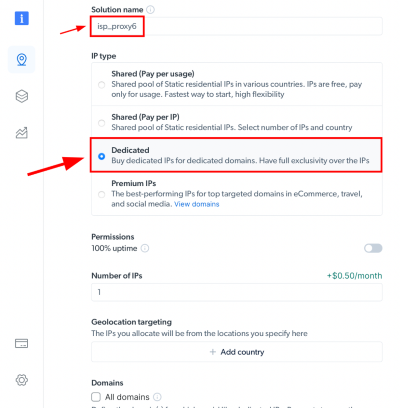
Here we will show ISP proxies option.

IP Type and Location Selection:

Name your solution. Set the IP type and choose the desired country and city for the IP location.

Specifiy domains:

Or use ‘All domains’ for one IP to target websites using the same IP.

Create zone:

Click the “Add” button to create the Zone.

Accessing proxy details:

Click on the name of your Zone, navigate to the “Access Parameters” tab, and note down the proxy credentials:

  • host
  • port
  • username
  • password

Download Shadowrocket:

Download Shadowrocket from the App Store. Luanch the app and select “Add Server“.

Proxy Configuration:

  • Under the “Type” menu, switch to “HTTP.”
  • For “Address“, input “brd.superproxy.io
  • If using the proxy manager, use “127.0.0.1” instead.
  • Set the “Port” as “33335.”


User name & password:

Retrieve the “Username” and “Password” from your designated Bright Data zone Access parameters settings.

User name & password:

Retrieve the “Username” and “Password” from your designated Bright Data zone Access parameters settings. 

Input the “Username” in the “User” field and the “Password” in the “Password” field, then click “Done.”

Activation and VPN Setup:

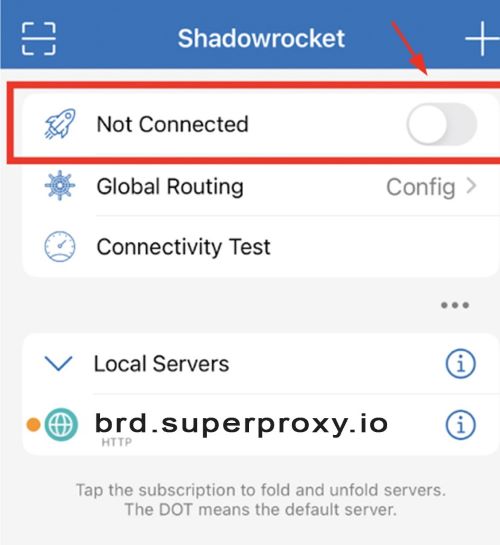
  • Toggle the “Not Connected” switch to activate.
  • If it’s your first time, you’ll be prompted to install the VPN Profile. Click “Ok.”
  • A secondary prompt will appear: “Shadowrocket would like to add VPN configuration.” Tap “Allow.”

⚠️Important note: If you are using Bright Data’s Residential Proxies, Web Unlocker or SERP API, you need to install an SSL certificate to enable end-to-end secure connections to your target website(s). This is a simple process, see https://docs.brightdata.com/general/account/ssl-certificate#installation-of-the-ssl-certificate for instructions.

Get proxies for Shadowrocket

proxy badges

受賞歴のあるプロキシネットワークを搭載

72百万以上の住宅用IPアドレス、クラス最高のテクノロジー とターゲットにする能力 国、都市、運送業者、ASN プレミアムプロキシサービスを開発者にとって最高の選択肢にします

Proxy Network Pricing

50%オフ
pay as you go plan icon
従量課金プラン
$8 $4.00 / GB
月額固定料金なし
無料トライアル
このクーポンコードを使用してください: RESIGB50

当社のプロキシを月額固定料金なしでご利用いただけます。
50%オフ
2nd plan icon
141 GB分無料
$7 $3.50 / GB
$499 / 月
無料トライアル
このクーポンコードを使用してください: RESIGB50

使用量が中程度の小規模ビジネスに最適
50%オフ
3rd plan icon
332 GB分無料
$6 $3.00 / GB
$999 / 月
無料トライアル
このクーポンコードを使用してください: RESIGB50

幅広い運用ニーズのある大規模チーム向けに設計
50%オフ
4th plan icon
798 GB分無料
$5 $2.50 / GB
$1999 / 月
無料トライアル
このクーポンコードを使用してください: RESIGB50

大規模な運営を管理する企業向けに最適化
1TB 以上必要ですか?
お問い合わせ
  • 無制限のスケール
  • 座席無制限
  • プレミアムSLA
  • ネットワークの稼働時間99.99%
  • 無料のプロキシマネージャー
  • データの完全なカバレッジ
  • 1GBあたりのカスタム価格
  • カスタムソリューション
pay as you go plan icon
従量課金プラン
$8 / GB
月額固定料金なし
無料トライアル
当社のプロキシを月額固定料金なしでご利用いただけます。
2nd plan icon
71 GB分無料
$7 / GB
$499 / 月
無料トライアル
使用量が中程度の小規模ビジネスに最適
3rd plan icon
166 GB分無料
$6 / GB
$999 / 月
無料トライアル
幅広い運用ニーズのある大規模チーム向けに設計
4th plan icon
399 GB分無料
$5 / GB
$1999 / 月
無料トライアル
大規模な運営を管理する企業向けに最適化
1TB 以上必要ですか?
お問い合わせ
  • 無制限のスケール
  • 座席無制限
  • プレミアムSLA
  • ネットワークの稼働時間99.99%
  • 無料のプロキシマネージャー
  • データの完全なカバレッジ
  • 1GBあたりのカスタム価格
  • カスタムソリューション
pay as you go plan icon
従量課金プラン
$8 / GB
月額固定料金なし
無料トライアル
当社のプロキシを月額固定料金なしでご利用いただけます。
2nd plan icon
71 GB分無料
$7 / GB
$499 / 月
無料トライアル
使用量が中程度の小規模ビジネスに最適
3rd plan icon
166 GB分無料
$6 / GB
$999 / 月
無料トライアル
幅広い運用ニーズのある大規模チーム向けに設計
4th plan icon
399 GB分無料
$5 / GB
$1999 / 月
無料トライアル
大規模な運営を管理する企業向けに最適化
1TB 以上必要ですか?
お問い合わせ
  • 無制限のスケール
  • 座席無制限
  • プレミアムSLA
  • ネットワークの稼働時間99.99%
  • 無料のプロキシマネージャー
  • データの完全なカバレッジ
  • 1GBあたりのカスタム価格
  • カスタムソリューション
pay as you go plan icon
従量課金プラン
$0.6 / GB
月額固定料金なし
無料トライアル
当社のプロキシを月額固定料金なしでご利用いただけます。
2nd plan icon
1 TB含む
$0.51 / GB
$499 / 月
無料トライアル
使用量が中程度の小規模ビジネスに最適
3rd plan icon
2 TB含む
$0.45 / GB
$999 / 月
無料トライアル
幅広い運用ニーズのある大規模チーム向けに設計
4th plan icon
5 TB含む
$0.42 / GB
$1999 / 月
無料トライアル
大規模な運営を管理する企業向けに最適化
1TB 以上必要ですか?
お問い合わせ
  • 無制限のスケール
  • 座席無制限
  • プレミアムSLA
  • ネットワークの稼働時間99.99%
  • 無料のプロキシマネージャー
  • データの完全なカバレッジ
  • 1GBあたりのカスタム価格
  • カスタムソリューション
これらの支払い方法を受け付けています:

プロキシとデータ収集の分野における業界トップ

毎日650TBの公共データが収集されている

毎日新機能をリリース

世界有数の大学10校のうち7校にサービスを提供

4.6/5トラストパイロット評価

Ready to get started?