---
title: "CrewAI & Bright Dataで不動産エージェントを構築する"
slug: crewai-real-estate-agent
date: 2025-08-24T08:55:59+00:00
modified: 2025-09-16T16:30:53+00:00
permalink: https://brightdata.jp/blog/ai/crewai-real-estate-agent
type: blog
---
[ ブログ ](https://brightdata.jp/blog "ブログ") / [AI](https://brightdata.jp/blog/ai)
[AI](https://brightdata.jp/blog/ai)
# CrewAI & Bright Dataで不動産エージェントを構築する
CrewAIとBright DataのMCPサーバーを使用して、不動産データ、市場分析、顧客エンゲージメントを自動化する方法をご覧ください。
11 分読
[  ](https://brightdata.com/blog/authors/arindam-majumder)
[Arindam Majumder
Technical Writer
](https://brightdata.com/blog/authors/arindam-majumder)

不動産業界は、インテリジェントなロボットやAIシステムが手作業に完全に取って代わり、大きな転換期を迎えている。不動産業界では、異種のデータセット、労働集約的な分析、規模の莫大な限界に対処することが多い。しかし、推論し、適応し、自律的に完全な不動産サービスを提供できるようなシステムが存在したらどうだろう?
このガイドで学ぶことができる:
- Webスクレイピング・インフラストラクチャと統合された最新のAIエージェント・フレームワークは、これらの問題をどのように解決するのか。
- CrewAIと[Bright DataのMCPサーバーを](https://github.com/brightdata/brightdata-mcp)使った最新の不動産エージェントの作り方。
始めよう!
## CrewAIとは?
[CrewAIは](https://www.crewai.com/)、コラボレーションAIエージェントをオーケストレーションするためのオープンソースのフレームワークです。CrewAIを使えば、エージェントができること、その目的、使用できるツールを明示的に指定することができます。これにより、エージェントをチームやクルーにグループ化することで、不動産における複雑なマルチステップワークフローの実行が可能になります。
CrewAIはこれらの重要なコンポーネントで構成されている:
1. エージェント。定義された役割、具体的な目標、任意のバックストーリーを持つLLM主導のワーカー。不動産ドメインのコンテキストがこのモデルに関連します。
2. **タスク。**1つのエージェントに対して、明確に定義された出力とスコープが設定された、品質管理の基準となる単一のジョブ。
3. **ツール。**物件データの取得や市場分析、あるいはBright DataのMCPエンドポイントを使用したスクレイピングなど、エージェントがドメイン固有の機能を呼び出すことができるプライベート機能。
4. **クルー。**不動産の目的には、それぞれが該当する任務を遂行し、協力して働くエージェントの集合体が含まれる。
5. プロセス。実行計画は、逐次的、並列的、階層的に行うことができ、タスクの順序、割り当て、委譲、繰り返しを管理する。
不動産チームは、不動産リサーチャーがデータ抽出を担当し、市場アナリストが洞察を提供し、クライアント・マネージャーがコミュニケーションを担当し、リスティング・スペシャリストがマーケティングを監督する。
CrawAIがBright Dataのようなツールとどのように統合されるかについては、こちらの[ガイドを](/blog/ai/crewai-with-bright-data-mcp-web-scraping)ご覧ください。
## MCPとは?
MCPは、オープンなJSON-RPC 2.0標準であり、AIエージェントは、単一の構造化されたインターフェイスを介して外部ツールやデータソースを呼び出すことができます。MCPは、不動産データ用のユニバーサルコネクターとお考えください。
Bright DataのMCPサーバーは、エージェントをBright Dataのスクレイピングスタックに直接配線することで、この標準を実践に移し、不動産データの抽出を従来のアプローチよりもはるかに簡単にします:
- **アンチボットバイパス。**リクエストは、Web Unlockerと195カ国にまたがる1億5千万以上のローテーションIPプールを経由して流れます。
- **ダイナミックサイトのサポート。**専用のスクレイピングブラウザがJavaScriptをレンダリングするため、エージェントは完全に読み込まれた物件リストを見ることができます。
- **構造化された結果。**多くのツールはクリーンなJSONを返すので、カスタムパーサーは必要ない。
サーバーには、一般的なURLフェッチから不動産に特化したスクレイパーまで、50以上の既製ツールが公開されており、CrewAIのエージェントは、1回の呼び出しで物件詳細、市場データ、またはリスティング情報を取得することができます。
## 私たちが築いているもの不動産業者
私たちは、Zillowページから不動産物件を調査し、詳細を構造化されたJSON出力として返すCrewAI不動産エージェントを構築します。
リンクとコードの一部を変更することで、他のプロパティにも使用できます。
### 前提条件
コードに入る前に、以下のセットアップが完了していることを確認してください:
- **Python 3.11**– 安定性のために推奨。
- **Node.js + npm**– Bright Data MCPサーバーの実行に必要です。
- **Python仮想環境**– 依存関係を隔離しておく。
- **Bright Dataアカウント**–[サインアップして](/)APIトークンを作成します。
- **Nebius APIキー**–[Nebius AI Studioで](https://studio.nebius.com/playground)キーを作成します(クリック**+ APIキーを取得**)。無料でご利用いただけます。課金プロファイルは必要ありません。
### ステップ1.環境設定
ターミナルで以下のコマンドを実行し、プロジェクト環境のセットアップと依存関係のインストールを行う:
```none
mkdir real-estate-ai-system && cd real-estate-ai-system
python -m venv venv
# macOS/Linux: source venv/bin/activate
# Windows: venv\\Scripts\\activate
pip install "crewai-tools[mcp]" crewai mcp python-dotenv pandas
```
`real_estate_agents.pyという`新しいファイルを作成し、以下のインポートを追加します:
```none
from crewai import Agent, Task, Crew, Process
from crewai_tools import MCPServerAdapter
from mcp import StdioServerParameters
from crewai.llm import LLM
import os
import json
import pandas as pd
from datetime import datetime
from dotenv import load_dotenv
load_dotenv()
```
### ステップ 2.Brightdata MCPサーバーの設定
プロジェクト・ルートに認証情報を含む`.env`ファイルを作成する:
```none
BRIGHT_DATA_API_TOKEN="your_api_token_here"
WEB_UNLOCKER_ZONE="your_web_unlocker_zone"
BROWSER_ZONE="your_browser_zone"
NEBIUS_API_KEY="your_nebius_api_key"
```
必要だ:
- **APIトークン**:Bright Dataのダッシュボードから新しいAPIトークンを生成します。
- **ウェブアンロッカーゾーン**不動産サイト用の新しいWeb Unlockerゾーンを作成する
- **ブラウザAPIゾーン**JavaScriptを多用する物件サイトのために、新しいBrowser APIゾーンを作成する。
- **Nebius APIキー**:前提条件で作成済み
この設定を`real_estate_agents.py`ファイルに追加します:
```none
llm = LLM(
model="nebius/Qwen/Qwen3-235B-A22B",
api_key=os.getenv("NEBIUS_API_KEY")
)
server_params = StdioServerParameters(
command="npx",
args=["@brightdata/mcp"],
env={
"API_TOKEN": os.getenv("BRIGHT_DATA_API_TOKEN"),
"WEB_UNLOCKER_ZONE": os.getenv("WEB_UNLOCKER_ZONE"),
"BROWSER_ZONE": os.getenv("BROWSER_ZONE"),
},
)
```
これは、サブプロセスとして`*npx @brightdata/mcp*を`起動し、不動産データ抽出のためのMCP標準を介して50以上のツールを公開します。
### ステップ 3.エージェントとタスクの定義
ここでは、エージェントのペルソナと具体的な仕事を定義します。CrewAIを実装する際には、タスクの設計を優先し、約80%の労力をタスクの設計に割き、エージェントの定義には20%しか割きません。`real_estate_agents.py`ファイルを更新して、エージェントとタスクの定義を追加します:
```none
def build_scraper_agent(mcp_tools):
return Agent(
role="Senior Real Estate Data Extractor",
goal=(
"Return a JSON object with snake_case keys containing: address, price, "
"bedrooms, bathrooms, square_feet, lot_size, year_built, property_type, "
"listing_agent, days_on_market, mls_number, description, image_urls, "
"and neighborhood for the target property listing page. Ensure strict schema validation."
),
backstory=(
"Veteran real estate data engineer with years of experience extracting "
"property information from Zillow, Realtor.com, and Redfin. Skilled in "
"Bright Data MCP, proxy rotation, CAPTCHA avoidance, and strict "
"JSON-schema validation for real estate data."
),
tools=mcp_tools,
llm=llm,
max_iter=3,
verbose=True,
)
def build_scraping_task(agent):
return Task(
description=(
"Extract property data from "
"and return it as structured JSON."
),
expected_output="""{
"address": "123 Main Street, City, State 12345",
"price": "$450,000",
"bedrooms": 3,
"bathrooms": 2,
"square_feet": 1850,
"lot_size": "0.25 acres",
"year_built": 1995,
"property_type": "Single Family Home",
"listing_agent": "John Doe, ABC Realty",
"days_on_market": 45,
"mls_number": "MLS123456",
"description": "Beautiful home with updated kitchen...",
"image_urls": ["", ""],
"neighborhood": "Downtown Historic District"
}""",
agent=agent,
)
```
各パラメーターの役割は以下の通り:
- CrewAI はすべてのシステムプロンプトに**@role**パラメータを注入します。
- **ゴール**– ノーススターのゴール。CrewAIは各ループステップの後にこれを比較し、停止するかどうかを決定する。
- **バックストーリー**– エージェントのトーンを導き、幻覚を減らすのに役立つドメイン知識。
- **tools**– BaseToolオブジェクト(例えば、MCP search\_engine、scrape\_as\_markdown)のリストを注入する。
- **llm**– CrewAIが思考→計画→行動→回答の各ルーチンで使用するモデルの定義。
- **max\_iter**– エージェントが実行できる内部ループのハードキャップ。
- **verbose**– すべてのプロンプト、すべての思考、すべてのツールコールを標準出力にストリームする(デバッグ用)。
- **説明**– アクション指向の指示が毎ターン注入される。
- **expected\_output**– 有効な回答に対する正式な契約 (厳密にはJSON。続くコンマはない)。
- **agent**– Crew.kickoff()の特定のエージェントインスタンスにこのタスクをバインドします。
### ステップ4.クルーの集合と実行
このパートは、エージェントとタスクを Crew に組み立て、ワークフローを実行します。Crew の組み立てと実行スクリプトを`real_estate_agents.py`ファイルに追加します:
```none
def scrape_property_data():
"""Assembles and runs the scraping crew."""
with MCPServerAdapter(server_params) as mcp_tools:
scraper_agent = build_scraper_agent(mcp_tools)
scraping_task = build_scraping_task(scraper_agent)
crew = Crew(
agents=[scraper_agent],
tasks=[scraping_task],
process=Process.sequential,
verbose=True
)
return crew.kickoff()
if __name__ == "__main__":
try:
result = scrape_property_data()
print("\\n[SUCCESS] Scraping completed!")
print("Extracted property data:")
print(result)
except Exception as e:
print(f"\\n[ERROR] Scraping failed: {str(e)}")
```
### ステップ5.スクレーパーを動かす
ターミナルからスクリプトを実行するコマンドを実行する:
```none
python real_estate_agents.py
```
各エージェントがタスクを計画し、実行するときのエージェントの思考プロセスをコンソールで見ることができます。
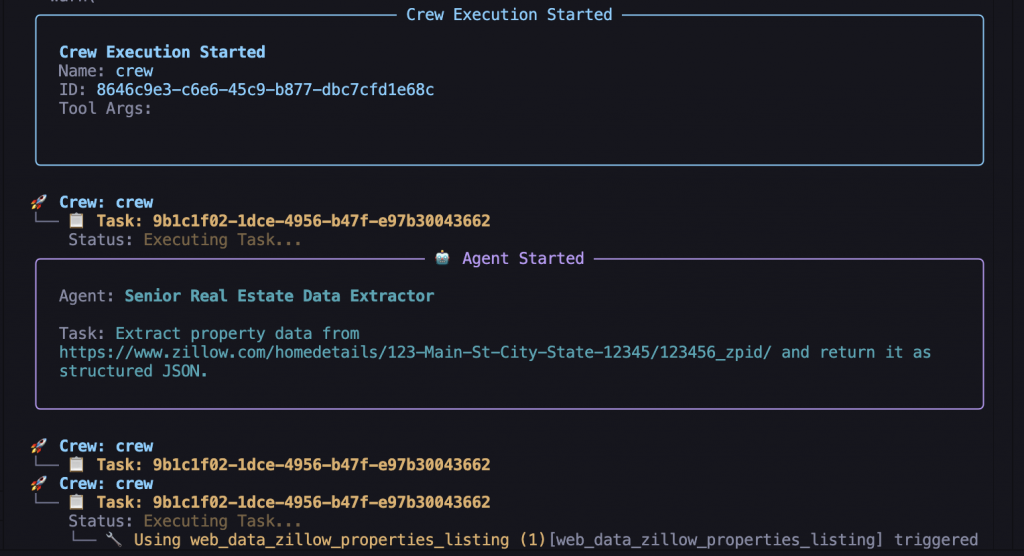最終的な出力は、きれいなJSONオブジェクトになる:
```none
{
"address": "123 Main Street, City, State 12345",
"price": "$450,000",
"bedrooms": 3,
"bathrooms": 2,
"square_feet": 1850,
"lot_size": "0.25 acres",
"year_built": 1995,
"property_type": "Single Family Home",
"listing_agent": "John Doe, ABC Realty",
"days_on_market": 45,
"mls_number": "MLS123456",
"description": "Beautiful home with updated kitchen...",
"image_urls": ["", ""],
"neighborhood": "Downtown Historic District"
}
```
## 高度な実装パターン
この基本的な例は核となる考え方を示しているが、実際の応用にはより多くの考察が必要である:
### 市場分析とリード・ジェネレーション
マーケット・インテリジェンスを構築するには、トレンドを分析し、機会を特定し、適格なリードを生成できるエージェントが必要です。これらのエージェントは、包括的な市場インサイトを提供し、見込み客を特定するために協力します。
これらの市場分析エージェントを`real_estate_agents.py`ファイルに追加します:
```none
def build_market_analysis_agent(mcp_tools):
return Agent(
role="Real Estate Market Analyst",
goal=(
"Analyze market trends, price movements, and investment opportunities. "
"Provide actionable insights for buyers, sellers, and investors based "
"on comprehensive market data and comparable property analysis."
),
backstory=(
"Senior market analyst with expertise in real estate economics, "
"property valuation, and investment analysis. Specializes in identifying "
"market trends, pricing anomalies, and investment opportunities using "
"statistical analysis and machine learning techniques."
),
tools=mcp_tools,
llm=llm,
max_iter=4,
verbose=True,
)
def build_lead_generation_agent(mcp_tools):
return Agent(
role="Real Estate Lead Generation Specialist",
goal=(
"Identify potential buyers and sellers based on market activity, "
"property searches, and behavioral patterns. Generate qualified "
"leads with contact information and engagement strategies."
),
backstory=(
"Lead generation expert with deep knowledge of real estate marketing, "
"customer behavior analysis, and digital prospecting. Experienced in "
"identifying high-value prospects and developing targeted outreach "
"campaigns for real estate professionals."
),
tools=mcp_tools,
llm=llm,
max_iter=3,
verbose=True,
)
def analyze_market_and_generate_leads(area_zip_code, price_range):
"""Perform market analysis and generate leads for a specific area."""
with MCPServerAdapter(server_params) as mcp_tools:
market_analyst = build_market_analysis_agent(mcp_tools)
lead_generator = build_lead_generation_agent(mcp_tools)
market_task = Task(
description=(
f"Analyze the real estate market for ZIP code {area_zip_code} "
f"within price range {price_range}. Research recent sales, "
"current listings, price trends, and market conditions. "
"Identify opportunities and provide investment recommendations."
),
expected_output="""{
"market_overview": {
"avg_price": "$000,000",
"median_price": "$000,000",
"price_trend": "increasing/decreasing/stable",
"days_on_market_avg": 00,
"inventory_levels": "high/medium/low"
},
"recent_sales": [],
"active_listings": 000,
"price_per_sqft_trend": "$000",
"investment_opportunities": [],
"market_forecast": "market_prediction",
"recommendations": []
}""",
agent=market_analyst,
)
lead_task = Task(
description=(
f"Generate qualified leads for {area_zip_code} area. "
"Identify potential sellers with properties likely to be listed, "
"buyers actively searching in the area, and investors looking "
"for opportunities. Include contact strategies and timing recommendations."
),
expected_output="""{
"potential_sellers": [],
"active_buyers": [],
"investor_prospects": [],
"lead_scoring": {
"high_priority": [],
"medium_priority": [],
"low_priority": []
},
"contact_strategies": [],
"follow_up_timeline": []
}""",
agent=lead_generator,
)
crew = Crew(
agents=[market_analyst, lead_generator],
tasks=[market_task, lead_task],
process=Process.sequential,
verbose=True
)
return crew.kickoff()
```
### 顧客との交流とコミュニケーション
効果的な顧客管理には、コミュニケーションを処理し、アポイントメントを予定し、不動産プロセスを通じて関係を維持することができる専門のエージェントが必要です。これらのエージェントは、一貫性のあるプロフェッショナルな顧客サービスを保証します。
これらの顧客管理エージェントを`real_estate_agents.py`ファイルに追加します:
```none
def build_client_communication_agent(mcp_tools):
return Agent(
role="Real Estate Client Relations Manager",
goal=(
"Manage client communications, schedule appointments, send follow-ups, "
"and maintain client relationships throughout the buying/selling process. "
"Provide personalized service and timely responses to client inquiries."
),
backstory=(
"Experienced client relations specialist with expertise in real estate "
"customer service, appointment scheduling, and relationship management. "
"Skilled in understanding client needs, managing expectations, and "
"maintaining long-term relationships for referrals and repeat business."
),
tools=mcp_tools,
llm=llm,
max_iter=3,
verbose=True,
)
def build_appointment_scheduler_agent(mcp_tools):
return Agent(
role="Real Estate Appointment Coordinator",
goal=(
"Schedule property viewings, client meetings, and follow-up appointments. "
"Coordinate between buyers, sellers, and agents to optimize scheduling "
"and maximize showing efficiency."
),
backstory=(
"Professional appointment coordinator with deep understanding of real "
"estate workflows, client preferences, and scheduling optimization. "
"Expert in managing complex calendars and coordinating multiple stakeholders."
),
tools=mcp_tools,
llm=llm,
max_iter=2,
verbose=True,
)
def handle_client_communication(client_inquiry, client_profile):
"""Process client inquiries and manage communications."""
with MCPServerAdapter(server_params) as mcp_tools:
communication_agent = build_client_communication_agent(mcp_tools)
scheduler_agent = build_appointment_scheduler_agent(mcp_tools)
communication_task = Task(
description=(
f"Process client inquiry: '{client_inquiry}' from client with "
f"profile: {client_profile}. Provide personalized response, "
"address their specific needs, and recommend next steps."
),
expected_output="""{
"response_message": "personalized_client_response",
"client_needs_assessment": {
"budget_range": "$000,000 - $000,000",
"preferred_locations": [],
"property_requirements": [],
"timeline": "timeframe"
},
"recommended_properties": [],
"next_steps": [],
"follow_up_schedule": "timing_recommendations"
}""",
agent=communication_agent,
)
scheduling_task = Task(
description=(
"Based on the client communication, schedule appropriate "
"follow-up appointments, property viewings, or consultation "
"meetings. Optimize scheduling for client convenience and "
"agent efficiency."
),
expected_output="""{
"scheduled_appointments": [],
"property_viewing_schedule": [],
"follow_up_reminders": [],
"calendar_integration": "scheduling_details"
}""",
agent=scheduler_agent,
)
crew = Crew(
agents=[communication_agent, scheduler_agent],
tasks=[communication_task, scheduling_task],
process=Process.sequential,
verbose=True
)
return crew.kickoff()
```
### 物件リストとマーケティング・オートメーション
マーケティングオートメーションには、魅力的なリスティング広告を作成し、検索エンジン向けに最適化し、複数のプラットフォームに配信できる専門エージェントが必要だ。
このマーケティングエージェントを`real_estate_agents.py`ファイルに追加します:
```none
def build_listing_manager_agent(mcp_tools):
return Agent(
role="Property Listing Marketing Manager",
goal=(
"Create compelling property listings, optimize for search engines, "
"and distribute across multiple platforms. Generate marketing materials "
"and track listing performance to maximize exposure and inquiries."
),
backstory=(
"Digital marketing specialist with expertise in real estate marketing, "
"SEO optimization, and multi-platform listing management. Experienced "
"in creating high-converting property descriptions and managing "
"marketing campaigns across MLS, Zillow, Realtor.com, and social media."
),
tools=mcp_tools,
llm=llm,
max_iter=4,
verbose=True,
)
```
### サーチ&ディスカバリー機能
インテリジェントな物件検索・推薦システムにより、顧客は特定のニーズや好みに的確にマッチした物件を見つけることができる。これらのエージェントは、パーソナライズされた物件発見・推薦サービスを提供します。
これらの検索・発見エージェントを`real_estate_agents.py`ファイルに追加します:
```none
def build_search_agent(mcp_tools):
return Agent(
role="Intelligent Property Search Specialist",
goal=(
"Provide intelligent property search and recommendation services. "
"Understand client preferences, search multiple databases, and "
"deliver personalized property recommendations with detailed analysis."
),
backstory=(
"Search technology expert with deep understanding of real estate "
"databases, property matching algorithms, and client preference analysis. "
"Specializes in advanced search techniques and personalized recommendation "
"systems for optimal property discovery."
),
tools=mcp_tools,
llm=llm,
max_iter=4,
verbose=True,
)
def build_recommendation_agent(mcp_tools):
return Agent(
role="Property Recommendation Engine",
goal=(
"Analyze client behavior, preferences, and market data to generate "
"personalized property recommendations. Learn from client feedback "
"and continuously improve recommendation accuracy."
),
backstory=(
"Machine learning specialist with expertise in recommendation systems, "
"behavioral analysis, and predictive modeling for real estate. "
"Experienced in developing personalized recommendation engines that "
"learn from user interactions and market trends."
),
tools=mcp_tools,
llm=llm,
max_iter=3,
verbose=True,
)
def intelligent_property_search(search_criteria, client_preferences):
"""Perform intelligent property search with personalized recommendations."""
with MCPServerAdapter(server_params) as mcp_tools:
search_agent = build_search_agent(mcp_tools)
recommendation_agent = build_recommendation_agent(mcp_tools)
search_task = Task(
description=(
f"Search for properties matching criteria: {search_criteria}. "
f"Client preferences: {client_preferences}. Use advanced search "
"techniques across multiple platforms and databases. Prioritize "
"results based on client preferences and market conditions."
),
expected_output="""{
"search_results": [],
"total_matches": 0,
"search_filters_applied": [],
"alternative_suggestions": [],
"market_insights": {
"avg_price_in_area": "$000,000",
"market_trends": "trend_analysis",
"inventory_levels": "availability_status"
}
}""",
agent=search_agent,
)
recommendation_task = Task(
description=(
"Analyze search results and client preferences to generate "
"personalized recommendations. Rank properties by relevance, "
"identify hidden gems, and suggest alternative options that "
"might meet client needs."
),
expected_output="""{
"top_recommendations": [],
"personalization_score": "0-100",
"recommendation_reasoning": [],
"alternative_options": [],
"learning_insights": {
"preference_patterns": [],
"behavior_analysis": "client_behavior_summary"
}
}""",
agent=recommendation_agent,
)
crew = Crew(
agents=[search_agent, recommendation_agent],
tasks=[search_task, recommendation_task],
process=Process.sequential,
verbose=True
)
return crew.kickoff()
```
### デプロイメントと本番セットアップ
最後に、すべての専門エージェントを調整する包括的なオーケストレーション・システムを作りましょう。この主要なシステム・クラスは、すべての不動産業務の中心的なハブとして機能する。
このメインシステムオーケストレーションを`real_estate_agents.py`ファイルに追加します:
```none
class RealEstateAgentSystem:
def full_property_analysis(self, property_url, client_profile=None):
with MCPServerAdapter(server_params) as mcp_tools:
research_agent = build_property_research_agent(mcp_tools)
market_analyst = build_market_analysis_agent(mcp_tools)
listing_manager = build_listing_manager_agent(mcp_tools)
research_task = build_property_research_task(research_agent, property_url)
market_task = Task(
description="Analyze market conditions for the researched property",
expected_output="Market analysis with trends and recommendations",
agent=market_analyst,
)
marketing_task = Task(
description="Create marketing strategy based on property and market analysis",
expected_output="Complete marketing campaign plan",
agent=listing_manager,
)
crew = Crew(
agents=[research_agent, market_analyst, listing_manager],
tasks=[research_task, market_task, marketing_task],
process=Process.sequential,
verbose=True
)
return crew.kickoff()
def client_service_workflow(self, client_inquiry, client_profile):
communication_result = handle_client_communication(client_inquiry, client_profile)
if "search" in client_inquiry.lower():
search_criteria = self.extract_search_criteria(client_inquiry)
search_result = intelligent_property_search(search_criteria, client_profile)
return {
"communication": communication_result,
"search_results": search_result
}
return communication_result
def extract_search_criteria(self, inquiry):
criteria = {
"price_range": "extracted_from_inquiry",
"location": "extracted_from_inquiry",
"property_type": "extracted_from_inquiry",
"bedrooms": "extracted_from_inquiry",
"bathrooms": "extracted_from_inquiry"
}
return criteria
def main():
system = RealEstateAgentSystem()
property_url = ""
try:
print("=== Starting Comprehensive Property Analysis ===")
analysis_result = system.full_property_analysis(property_url)
print("\\n=== Analysis Complete ===")
print("Extracted property data:")
print(json.dumps(analysis_result, indent=2) if isinstance(analysis_result, dict) else str(analysis_result))
client_inquiry = "I'm looking for a 3-bedroom house under $500,000 in downtown area"
client_profile = {
"name": "John Smith",
"budget": "$450,000",
"preferred_locations": ["downtown", "midtown"],
"timeline": "3 months"
}
print("\\n=== Processing Client Inquiry ===")
service_result = system.client_service_workflow(client_inquiry, client_profile)
print("\\n=== Client Service Complete ===")
print("Client service results:")
print(json.dumps(service_result, indent=2) if isinstance(service_result, dict) else str(service_result))
print("\\n=== Analyzing Market and Generating Leads ===")
market_leads = analyze_market_and_generate_leads("90210", "$500,000-$1,000,000")
print("\\n=== Market Analysis Complete ===")
print("Market analysis and leads:")
print(json.dumps(market_leads, indent=2) if isinstance(market_leads, dict) else str(market_leads))
except Exception as e:
print(f"\\n[ERROR] System execution failed: {str(e)}")
if __name__ == "__main__":
main()
```
## コストの最適化
Bright DataのMCPは利用ベースなので、追加リクエストのたびに課金されます。コストを抑えるためのヒントをいくつかご紹介します:
- リスティングサイトやデータセット全体をクロールする代わりに、必要な物件フィールドのみをリクエストします。
- CrewAIのツールレベルのキャッシュを有効にして、プロパティデータが変更されていない場合に呼び出しをスキップし、時間とクレジットの両方を節約します。
- デフォルトはWeb Unlockerゾーンで、複雑なプロパティ・サイトでJavaScriptレンダリングが不可欠な場合にのみ、Browser APIゾーンに切り替えます。
- 各エージェントに、問題のあるリスティングを永遠にループさせないよう、妥当な最大反復回数を与える。
これらのプラクティスに従うことで、CrewAIエージェントはコスト効率と信頼性を維持し、本番の不動産業務に対応することができます。
## 結論
このチュートリアルを通して、[Bright DataのMCPサーバーを](https://github.com/brightdata/brightdata-mcp)使用してCrawAI不動産エージェントを構築する方法を学んだ。
私たちはまず、これらの技術がどのようなもので、どのように使われているかを理解することから始めた。そして、不動産エージェントを構築するためにさらに進んだ。ブライトデータのMCPサーバーのセットアップ、LLMの設定、エージェントの作成、タスクの定義、タスククルーの組み立て。
これらのエージェントを他の不動産ターゲットに簡単に適応させることができる。例えば、Zillowの代わりに[Realtor.comから](http://realtor.com/)スクレイピングするには、エージェントの役割、目標、バックストーリー、タスクの説明、出力として期待するものを微調整するだけでよい。
お問い合わせ無料トライアル
目次
日本企業向けデータソリューション
日本のトップ企業が信頼するスケーラブルなウェブデータプラットフォーム。日本語24時間サポート、GDPR・個人情報保護法準拠、日本企業20社以上の導入実績。
[詳細を見る](https://brightdata.jp/solutions/data-solutions-for-japanese-companies "詳細を見る")
[ ](https://news.ycombinator.com/submitlink?t=CrewAI+%26amp%3B+Bright+Data%E3%81%A7%E4%B8%8D%E5%8B%95%E7%94%A3%E3%82%A8%E3%83%BC%E3%82%B8%E3%82%A7%E3%83%B3%E3%83%88%E3%82%92%E6%A7%8B%E7%AF%89%E3%81%99%E3%82%8B&u=https://brightdata.jp/blog/ai/crewai-real-estate-agent) [ ](https://www.linkedin.com/shareArticle?mini=true&title=CrewAI+%26amp%3B+Bright+Data%E3%81%A7%E4%B8%8D%E5%8B%95%E7%94%A3%E3%82%A8%E3%83%BC%E3%82%B8%E3%82%A7%E3%83%B3%E3%83%88%E3%82%92%E6%A7%8B%E7%AF%89%E3%81%99%E3%82%8B&url=https://brightdata.jp/blog/ai/crewai-real-estate-agent) [ ](http://www.reddit.com/submit?title=CrewAI+%26amp%3B+Bright+Data%E3%81%A7%E4%B8%8D%E5%8B%95%E7%94%A3%E3%82%A8%E3%83%BC%E3%82%B8%E3%82%A7%E3%83%B3%E3%83%88%E3%82%92%E6%A7%8B%E7%AF%89%E3%81%99%E3%82%8B&url=https://brightdata.jp/blog/ai/crewai-real-estate-agent)
## あなたは下記にもご興味がおありかもしれません
[  ](https://brightdata.jp/blog/ai/openhuman-with-bright-data "Bright Data CLIを通じたOpenHumanにおける本番対応ウェブアクセス")
[AI

Antonello Zanini
Technical Writer
### Bright Data CLIを通じたOpenHumanにおける本番対応ウェブアクセス
Bright Data CLIをOpenHumanに統合して、AIエージェント向けの本番対応ウェブアクセスとデータ収集を実現します。
09-Sep-2026
3 分読
](https://brightdata.jp/blog/ai/openhuman-with-bright-data)
[  ](https://brightdata.jp/blog/%e3%82%a6%e3%82%a7%e3%83%96%e3%83%87%e3%83%bc%e3%82%bf/multimodal-web-scraping-with-minimax "MiniMaxによるマルチモーダルウェブスクレイピング")
[ウェブデータ

Antonello Zanini
Technical Writer
### MiniMaxによるマルチモーダルウェブスクレイピング
Bright Data Web UnlockerとMiniMax M3ビジョンを組み合わせて、画像やウェブページのスクリーンショットから構造化データを抽出します。
09-Sep-2026
1 分読
](https://brightdata.jp/blog/%e3%82%a6%e3%82%a7%e3%83%96%e3%83%87%e3%83%bc%e3%82%bf/multimodal-web-scraping-with-minimax)
[  ](https://brightdata.jp/blog/ai/best-cli-tools-for-codex "2026年版 Codex向けCLIツール10選 – テスト&ランキング")
[AI

Daniel Shashko
Web Data & AI Expert
### 2026年版 Codex向けCLIツール10選 – テスト&ランキング
Codexをより速く、より有能にする10のCLIツール。サンドボックス内から実際のウェブアクセスを提供するBright Data CLIから始まります。
06-Sep-2026
4 分読
](https://brightdata.jp/blog/ai/best-cli-tools-for-codex)